
Calendly is good at the job it was designed for. Someone picks a slot, the slot leaves your calendar, both parties get an email. For a consultant selling an hour of their time, that is the whole problem, and paying for anything more would be waste.
The trouble starts when a business with staff, rooms, equipment, deposits, and repeat customers tries to run on it. Not because Calendly is bad, but because it is a scheduling layer sitting on top of a calendar, and a calendar is not a model of your business. Everything the calendar cannot represent has to live somewhere else, and that somewhere else is usually a person.
What a Calendar Cannot Represent
A calendar event has a start, an end, and a title. That is the data model. Every real constraint in a service business is something the calendar has no field for, so it gets encoded as a workaround: a naming convention, a color, a separate spreadsheet, or an instruction someone has to remember.
- Resources. Two stylists can work at once, but there is one shampoo bowl. One treatment room. One lift. The calendar will happily double-book the constraint it cannot see.:
- Service duration that varies by customer. A first-time color is not a root touch-up. A quoted duration that ignores history runs the day late by mid-morning.:
- Prep and turnover. The appointment is 45 minutes and the room needs 15 to reset. Padding rules that live in someone's head get skipped when the day is busy.:
- Deposits and cancellation terms. Taking money at the point of booking is the single most effective no-show control, and it has to happen inside the booking flow to work.:
- Staff rules. Who is qualified for which service, who is on which rota, who gets the walk-in. A calendar knows only who is free.:
- The customer. Not the email address on the invite. The person, their history, what they bought, what they cancelled, and what to send them in six weeks.:
Each one has a workaround. The workarounds are the cost. They are invisible on the invoice and they are paid every day, by the person who has to catch the double-booked room before the customer does.
The Honest Comparison
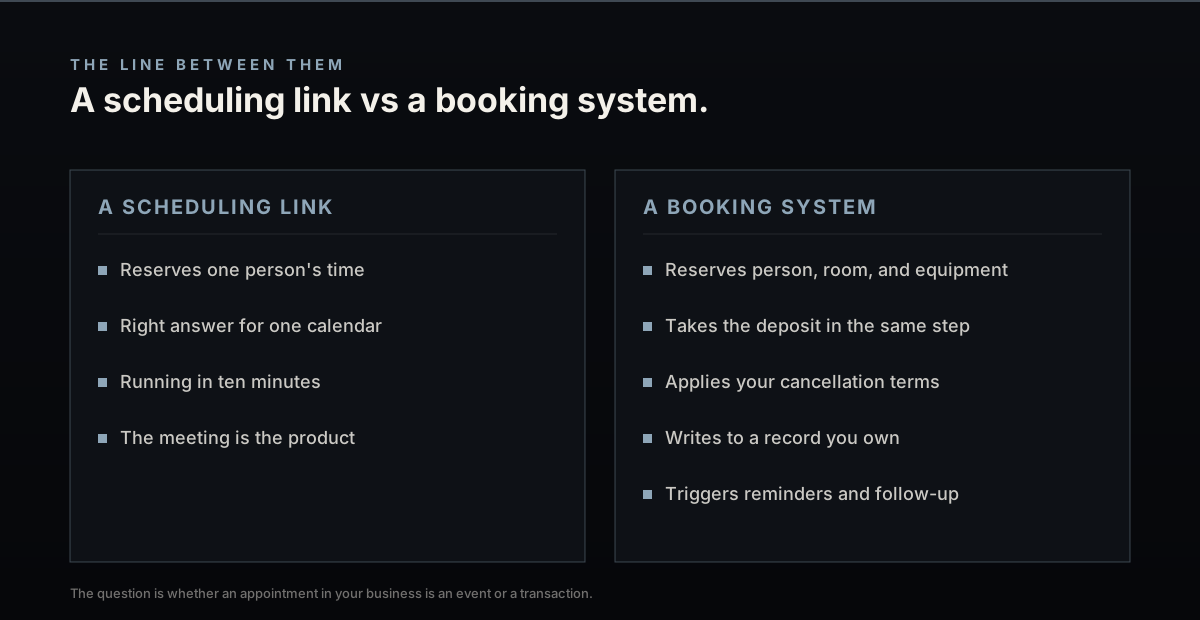
Calendly wins on time to value. It is running in ten minutes, it costs very little, and for one person selling appointments it is the right answer. It also wins when the meeting is the product and nothing happens before or after it.
A custom booking system wins when the appointment is the start of an operation and not the whole of it. When a booking has to reserve a room and a person and a machine at the same time, take a deposit, apply your cancellation terms, write to a customer record you own, and trigger the reminder sequence that keeps the chair full, you are describing software with a data model. A scheduling link cannot become that by adding integrations to it.
The question is not which tool is better. It is whether an appointment in your business is an event or a transaction.
The Integration Trap
The usual middle path is Calendly plus Zapier plus a payment link plus a CRM plus an SMS tool. It works, for a while. What it produces is a booking flow assembled from five vendors, where the customer record is split across all five, and where a failure in any one of them is silent.
That stack also has a running cost that nobody adds up: five subscriptions, per-task automation fees that scale with volume, and the hours spent reconnecting it when one vendor changes an API. The reason it feels cheaper is that the bill arrives in five pieces and the maintenance arrives as somebody's afternoon.
We have written about the compounding version of this problem in the analysis of what a stack of cheap tools costs once the workarounds are priced, and about why per-task automation platforms become the fragile center of an operation they were never meant to hold.
When to Stay on Calendly
- One person, one service, one calendar, and no deposits.:
- The appointment is free and there is no cost to a no-show.:
- Nothing has to happen after the meeting that a human is not already doing by hand.:
- You are testing whether the offer sells at all. Prove demand before building anything.:
That last one matters. Building a booking system before you know people will book is the expensive mistake in the other direction.
When the Scheduling Link Has Run Out
- Someone manually rearranges the day's schedule more than once a week.:
- No-shows are a number you can feel, and you have no deposit mechanism to stop them.:
- Two bookings can collide over a resource the calendar does not know exists.:
- Customer history lives in a spreadsheet, a notes app, or a memory.:
- Adding a location or a service means redoing the setup instead of adding a row.:
At that point the scheduling link is not the system. It is the part of the system that is visible, and the rest of it is people. A booking engine built around your actual constraints puts the rules back in software, where they apply every time instead of when someone remembers. If that is the position you are in, the booking systems we build start from your constraints, not from a calendar.